Owner's Manual
Everything a buyer needs: how the strategy trades, every profile, every dashboard row — without the formulas.
Every figure comes from TradingView Deep Backtesting and can be reproduced on your own chart.
A complete long-only bitcoin system for the 15-minute chart
Open on TradingView →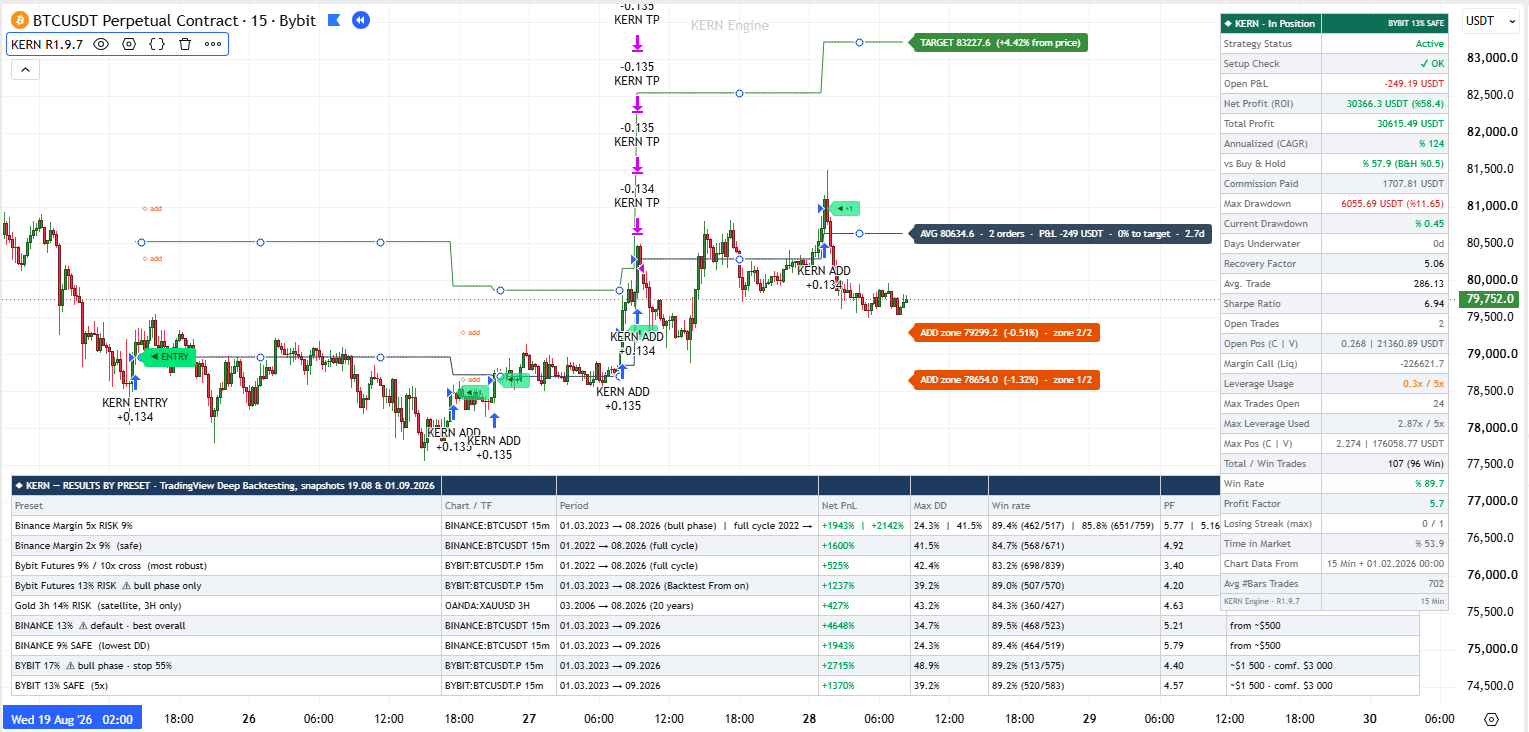
Script version: R1.9.14 (the publication build, English interface). Every figure in this manual comes from TradingView Deep Backtesting, snapshots of 12–13 September 2026 (the Bitunix profiles — 22.09.2026), and every row was re-verified on this exact version. The manual describes how the strategy behaves, how to configure it, how to read the dashboard and the chart, how to choose a profile and how to live with it day to day. The internal mechanism of entries and position building is the closed part of the product: this is a description of behaviour, not of formulas.
Automated trading runs through the Telegram bot, which has its own manual (KERN_bot_manual_RU.md / the bot's KERN-MODE.md). This manual covers the bot only where the strategy side needs it.
Script version: R1.9.14 (the publication build, English interface). Every figure in this manual comes from TradingView Deep Backtesting, snapshots of 12–13 September 2026 (the Bitunix profiles — 22.09.2026), and every row was re-verified on this exact version. The manual describes how the strategy behaves, how to configure it, how to read the dashboard and the chart, how to choose a profile and how to live with it day to day. The internal mechanism of entries and position building is the closed part of the product: this is a description of behaviour, not of formulas.
Automated trading runs through the Telegram bot, which has its own manual (KERN_bot_manual_RU.md / the bot's KERN-MODE.md). This manual covers the bot only where the strategy side needs it.
0. Before you start
TradingView Premium or higher. Only these plans have Deep Backtesting — the mode that computes the whole history of a 15-minute chart. On Essential and Plus the script sees the last few months, and the figures from the description will not match: not because they are wrong, but because there is not enough history. TradingView offers its own 30-day Premium trial. For live trading on alerts any paid plan is enough, but the reference figures cannot be verified without Premium.
Access to the script. Once access is granted, the strategy appears in the Indicators window → the "Invite-only scripts" tab → KERN Engine Strategy. It will not be in "My scripts" — a frequent first-day panic.
The right chart. The strategy is built for specific symbols and timeframes. The first run is on BINANCE:BTCUSDT, 15 minutes only. The chart for each profile is listed in section 4.
Standard candles. Heikin Ashi, Renko, Kagi and other synthetic chart types are forbidden: the strategy would see invented prices, so it blocks entries. Setup Check reports "chart type: standard candles required".
Understanding the risk. Working drawdowns of the profiles are 24% to 49% from the equity peak, and weeks or months under water are part of the deal. If a drawdown of that size would change your life plans, the account size is wrong. Read section 13 before switching anything on with real money.
A separate account. The strategy trades a percentage of the whole capital it sees: in the tester that is the initial capital, on the exchange it is the balance of the account the bot is connected to. That is why the strategy gets its own sub-account, and only the part of your money you are prepared to expose to the profile's drawdown is moved there. How to size that part — section 6.0.
1. Quick start — the first run in 10 minutes
- Open BINANCE:BTCUSDT, timeframe 15m, chart type — regular candles.
- Add the strategy (Indicators → Invite-only scripts → KERN Engine Strategy). The BINANCE 9% SAFE profile is already selected by default and the backtest start limit is on with the date 01.03.2023. Nothing needs to change for the first run.
- Check the chart legend: next to the name it must read KERN R1.9.14. If it shows another version, you have an old instance — remove the strategy from the chart and add it again.
- Open the Strategy Tester at the bottom. Click the date range in its header → "Custom date range" → set the start as early as possible (the "Select first available date" link), the end — today → "Select". The tester header now says "Deep Backtesting". Initial capital — anything, 50,000 or 1,000 (section 9.3).
- In the dashboard at the top right of the chart find the Setup Check row — it must read ✔ OK, and Strategy Status — Active.
- Compare the tester report with the reference: BINANCE 9% SAFE must show 464 of 519 trades, drawdown 24.3%, PF 5.77. The headline profit percentage (+1897% on 13.09.2026) breathes from day to day because of the open position — section 9.4.
- Only after the trade count matches move on to choosing a working profile, the exchange and the bot.
If something does not match — section 9.5 has the checking order.
2. How the strategy trades — in plain words
This is the only section about "what is inside", and it is deliberately free of formulas. It is enough to understand everything you will see on the chart and in the bot's messages.
One instrument, one direction, one timeframe. The strategy trades long only, BTC only, on the 15-minute chart of the listed exchange (gold on 3H is the single exception, and it is a satellite). No shorts. No other coins. Other timeframes are blocked.
Entry. The strategy waits for the market to form a specific structure of movement and confirm a reversal upwards. Confirmation comes only on the close of a candle: the strategy never evaluates a candle that is still forming. That is why nothing repaints, and why the chart markers update once every 15 minutes. The entry is a market order at the open of the next candle. On the chart it is the KERN ENTRY marker.
Building the position. Right after the entry the strategy places one or two pending orders above the price — at the points where the structure of the move confirms itself. On the chart they are labelled ADD zone at the right edge, with the level, the distance from price and the zone number ("zone 1/2"). These are real pending orders, not a drawing: they fill inside a candle the moment the level is touched. A filled add-on gets the KERN ADD marker. While the position is open, new entries on new structures and new add-ons to them can arrive — that is how the "stack" of several orders grows. In the verified runs the stack held several dozen orders at once.
Target and stop. Every order has its own target, computed from the structure, with a minimum size (1% for the main profiles). The whole position at the same time has one shared target and one shared protective stop — the size-weighted averages of the targets and stops of all orders. The stack closes as a whole: either entirely at the target (the KERN TP marker) or entirely at the stop (KERN SL). There are no partial exits. The protective stop of the main profiles sits 15% below the entry price of each order; for KRAKEN 9% (2x) it is 22.5%, for BINANCEUS 11% (2x) 8.4%. It is a distant stop: not "trade management" but insurance against a crash. The main way out is the target, hence the 83–90% share of profitable trades.
Size. Every order is a percentage of current equity (9%, 13%, 17% — by profile). The account grows — orders grow; that is compounding, and it is also why the account size barely affects the percentage result. The profile's leverage cap (2x, 3x, 5x, 10x) is capacity: how much capital in total can be loaded into the stack. Actual usage is usually 1–3x; the peak of the run is on the dashboard (Max Leverage Used).
Capital protection. If equity falls 47% from its historical peak (55% for BYBIT 17% and BITUNIX 17% RISK), the strategy closes everything at market, cancels pending orders and stops for good. Details — section 10.
What the strategy does not do. It does not flip short, does not average down without a structure, does not move the stop to breakeven, does not exit on time, does not trade news. If it feels like "it should have exited" — it should not have. The system lives in episodes of days and weeks.
3. Settings — six groups, every field
Settings open with the gear next to the strategy name on the chart, or by double-clicking the name. Everything that affects trades sits in groups 1–3; groups 4–6 are appearance and the link to the bot. Field names are as in the interface.
⚙️ 1 · Trading Profile
Trading profile — the only setting that defines trading. A profile sets the position size, the leverage cap and all confirmation parameters for a specific exchange. Nothing beyond that needs to be — or can be — configured: the calibration is built into the profile. Nineteen options: eighteen ready-made profiles and Custom. All of them — section 4.
The rule: the profile must match the chart. BINANCE profiles — on BINANCE:BTCUSDT, BYBIT — on BYBIT:BTCUSDT.P, KRAKEN — on KRAKEN:BTCUSD, COINBASE — on COINBASE:BTCUSD, BINANCEUS — on BINANCEUS:BTCUSD, BITUNIX — on BITUNIX:BTCUSDT.P, gold — on XAUUSD or PAXG on 3H. Setup Check verifies this and, since R1.9.12, skips no profile (it used to skip four).
The field's tooltip reminds you: set the venue commission manually on the Properties tab — section 6.3.
🛡️ 2 · Risk & Position Size
Size override (%) — replaces the position size of the selected profile without touching its leverage or anything else. 0 = the profile's size. This is the only supported way to reduce risk: return and drawdown fall almost proportionally (a guide: 7 instead of 9 ≈ −35% of the result and −8 percentage points of drawdown; that is an estimate, not a guarantee — add-ons, leverage and compounding make the relation not quite linear). The size cannot be raised above the profile's: anything above the ceiling is trimmed automatically, because the system loses stability at an inflated size. Ceilings: the profile's size for the crypto profiles, 5% for the spot profiles, 12% for gold. The field does not apply to the Custom profile (it has its own size field). The field's range ends at 12%, so BYBIT 17% cannot be set to 13–16% through the override — BYBIT 13% SAFE exists for that.
Capital protection stop (on by default) and at % from peak (47 by default) — the emergency protocol, section 10. Do not disable it in live trading. The factory 47% keeps a margin above the working drawdown; a tighter threshold stops a healthy strategy in an ordinary drawdown. For BYBIT 17% and BITUNIX 17% RISK the threshold rises to 55% automatically whatever you enter — the effective value is on the dashboard (the Protection stop row).
Custom · position size (%) (max 9) and Custom · leverage cap (x) (max 10) — active only with the Custom profile. The size is a percentage of current equity per order. The cap is the upper limit of exposure, not the working leverage.
📅 3 · Backtest Window
Limit backtest start (on) with a date (factory — 1 March 2023, 00:00 UTC). It limits the historical run: trades are counted from this date only. 01.03.2023 is the bottom of the bear market and the certification window of the bull-phase profiles. Switch it off to compute the whole history including the 2022 bear year — but only on the full-cycle profiles (section 4). Profiles sized 13% and above end in an emergency stop in 2022 on the full cycle — that is the protection working, not a fault.
Live trading is not affected: the date is in the past and every new candle is inside the window. Since R1.9.12 the window has no hidden end date (earlier versions had one — 01.01.2030).
The date is used in one more case — resuming after an emergency stop, section 10.
📊 4 · Dashboard & Tables
Quote currency — the currency caption on the dashboard (USDT / USD / BTC / EUR). No effect on calculations.
Verified results table (off by default) and its corner — a static table of verified results by profile, hard-coded into the script. It computes nothing and exists for one purpose: comparing your run with the reference without opening the description. Turn it on when checking, off when working — it covers part of the chart.
🎨 5 · Appearance
Theme (Auto — from the chart background), colours of bullish and bearish markers, sizes of markers and level labels, fonts of the dashboard and the table, line styles of the target and stop history, watermark. None of these affects trades. Normal or Large fonts work best for screenshots.
🔔 6 · Alerts & Webhook
Bot ID / tag — a free-form tag that goes into the tag field of every message. Lets one webhook serve several charts or accounts. No quotes.
Message format — JSON (for bots, recommended), Text (a human-readable line for Telegram or email), Custom (your own template from the field below; this is how the bundled bot is configured).
Custom template — a template with tokens in curly braces, list in section 11.3.
Info events (on) — extra events: a pending add-on was placed or cancelled, the emergency protocol fired.
Position snapshots (on) — a snapshot of the position at candle close when something changed: average price, shared target, shared stop, order count, size. It lets the bot keep protective stop and limit orders on the exchange.
Snapshot heartbeat (bars) (0 = off) — repeats the snapshot every N candles even when nothing changed. Lets you confirm the TradingView → bot link before the first trade and recovers a lost snapshot. Enable it only with a reconciling bot (the bundled one is): an executor that treats snapshots as orders would repeat them.
4. Profiles — all eighteen, in detail
All profiles use the same engine. They differ by exchange (hence quotes and fees), order size, leverage cap and — for the thin-feed venues and gold — the confirmation parameters. The parameters cannot and need not be changed.
4.1 Summary table
Conditions of every row: TradingView Deep Backtesting, 0.1% commission per side, 3 ticks of slippage, initial capital 50,000. The "bull phase" window is from 01.03.2023 (start limit on), "full cycle" from 01.01.2022 (limit off or dated 01.01.2022). All windows end on 13.09.2026, the BITUNIX rows on 22.09.2026. The "Trades" column is profitable orders out of all orders, add-ons included.
| Profile | Chart | Size · cap | Window | Result · drawdown | Trades · PF | Min. capital |
|---|---|---|---|---|---|---|
| BINANCE 9% SAFE (default) | BINANCE:BTCUSDT 15m | 9% · 5x | bull | +1897% · 24.3% | 464/519 · 5.77 | ~$500 |
| BINANCE 13% | BINANCE:BTCUSDT 15m | 13% · 5x | bull | +4496% · 34.7% | 468/523 · 5.18 | ~$500 |
| Binance Margin 5x RISK (9%) | BINANCE:BTCUSDT 15m | 9% · 5x | bull* | as SAFE | as SAFE | ~$1,000 |
| Binance Margin 2x (9%) | BINANCE:BTCUSDT 15m | 9% · 2x | full cycle | +1565% · 41.5% | 571/674 · 4.93 | ~$1,000 |
| BYBIT 17% | BYBIT:BTCUSDT.P 15m | 17% · 5x | bull | +2738% · 48.9% | 518/580 · 4.47 | ~$1,500, comfortable $3,000 |
| BYBIT 13% SAFE | BYBIT:BTCUSDT.P 15m | 13% · 5x | bull | +1379% · 39.2% | 525/588 · 4.63 | ~$1,500, comfortable $3,000 |
| Bybit Futures 13% RISK | BYBIT:BTCUSDT.P 15m | 13% · 10x cross | bull | as 13% SAFE | as 13% SAFE | ~$3,000 |
| Bybit Futures (9%) | BYBIT:BTCUSDT.P 15m | 9% · 10x cross | full cycle | +544% · 43.7% | 716/857 · 3.52 | $10,000 |
| Bybit Spot (5%) | BYBIT:BTCUSDT 15m | 5% · 1x | full cycle | +183% · 31.7% | 590/712 · 2.95 | ~$1,000 |
| Binance Spot (5%) | BINANCE:BTCUSDT 15m | 5% · 1x | full cycle | +448% · 25.2% | 428/515 · 6.42 | ~$1,000 |
| Gold 3h 14% RISK | OANDA:XAUUSD 3H | 14% · 10x | 2006 → 2026 | +489% · 43.2% | 380/455 · 4.92 | PAXG ~$1,000 / XAUUSD by lot |
| Gold 3h (12%) | OANDA:XAUUSD 3H | 12% · 10x | 2006 → 2026 | +368% · 37.7% | 378/454 · 4.78 | as above |
| KRAKEN 9% (2x) | KRAKEN:BTCUSD 15m | 9% · 2x | bull | +398% · 35.9% | 237/264 · 4.34 | ~$1,500 (not tested) |
| COINBASE 9% (3x) | COINBASE:BTCUSD 15m | 9% · 3x | bull | +503% · 39.2% | 595/700 · 3.53 | ~$1,500 (not tested) |
| BINANCEUS 11% (2x) | BINANCEUS:BTCUSD 15m | 11% · 2x | from 20.02.2025 | +60% · 29.8% | 191/256 · 1.93 | ~$1,500 (not tested) |
| BITUNIX 15% | BITUNIX:BTCUSDT.P 15m | 15% · 5x | bull** | +1741% · 41.8% | 596/699 · 2.55 | ~$500 |
| BITUNIX 11% SAFE | BITUNIX:BTCUSDT.P 15m | 11% · 5x | bull** | +888% · 31.9% | 591/695 · 2.72 | ~$500 |
| BITUNIX 17% RISK | BITUNIX:BTCUSDT.P 15m | 17% · 5x · stop 55 | bull** | +2296% · 46.4% | 595/696 · 2.47 | ~$500 |
** The BITUNIX rows were taken on 22.09.2026, the others on 13.09.2026; the window is the same, from 01.03.2023.
* Binance Margin 5x RISK (9%) on the bull window produces the same trades as BINANCE 9% SAFE — they share size and cap. Its purpose is the full cycle from 2022 (section 4.3).
Where it says "as SAFE" or "as 13% SAFE", the trades match one for one — verified.
4.2 BINANCE 9% SAFE — the default profile
The BINANCE:BTCUSDT chart (spot), traded on a Binance margin account with a 5x leverage cap. Order size 9% — within the "no more than 10% per trade" guideline. The lowest drawdown among the main profiles (24.3%) at +1897% over the bull window. Peak leverage load in the run — 1.9x of 5x, liquidation far away. For whom: the first live run, a conservative account, everyone who wants "quiet money". Minimum capital ~$500 — verified by a run: on $500 and on $50,000 the trade set is identical, the only difference is rounding to the lot step.
4.3 BINANCE 13% — the strongest profile
The same chart and 5x cap, size 13%. +4496% at a 34.7% drawdown — the best return-to-risk ratio of the lineup, but the size is above 10% per order, so it is not the default and is switched on deliberately, in one click. Peak load 3.4x of 5x. Bull phase only. On the full cycle from 2022 a size like this ends in an emergency stop in the bear year: that is the protection working, not a fault, but you cannot expect "+4496% through a bear market" from it. Minimum capital ~$500.
4.4 Binance Margin 5x RISK (9%) and Binance Margin 2x (9%) — full-cycle profiles
The same 9% on the same chart, but their purpose is the history from January 2022, the bear year included. To see it, switch Limit backtest start off (or set the date 01.01.2022). The 2x variant is certified on the full cycle: +1565% at a 41.5% drawdown, 571 of 674 trades. This is the profile for those who want the bear year in the backtest and want to trade through any market regime without switching the system off.
About 5x RISK, honestly: at peak exposure the liquidation price in isolated margin sits right next to the protective stop (about −15.7% versus −15%). A gap or accrued borrow interest can close the position before the stop does. A deliberate choice, not a recommendation. The 2x variant is the safe one: liquidation far away; never raise the exchange leverage above 2x.
4.5 BYBIT 17% — the aggressive bull-phase profile
BYBIT:BTCUSDT.P (perpetual contract), 5x cap, size 17%. +2738% at a 48.9% drawdown. Its particularity: the emergency-stop threshold is raised to 55% automatically, because the profile's working drawdown is ~49% — at the standard 47% it would stop in an ordinary drawdown. You accept this consciously: a drawdown of half the account here is not a hypothesis but a fact of the backtest. Bull phase only. Minimum capital ~$1,500 (the result is ~11% below the reference there because of the lot step), comfortable from $3,000.
4.6 BYBIT 13% SAFE — the balanced Bybit profile
The same contract, size 13%, 5x cap: +1379% at a 39.2% drawdown, peak load 2.9x. Standard 47% protection threshold. The sensible choice for Bybit if 17% feels like too much. From ~$1,500, comfortable from $3,000.
4.7 Bybit Futures 13% RISK and Bybit Futures (9%) — 10x cross-margin profiles
First-generation profiles on BYBIT:BTCUSDT.P with a 10x cap in cross margin. 13% RISK on the bull window gives the same trades as BYBIT 13% SAFE (the 5x versus 10x cap never binds in these runs) — kept for compatibility with early bot setups. Bybit Futures (9%) — full cycle from 2022: +544% at a 43.7% drawdown, 716 of 857 trades, the most robust profile over the whole history: the lowest return, but not a single protection trigger and the longest sample. Minimum capital is higher than the rest because of Bybit's 0.001 BTC lot step: ~$3,000 and $10,000. Cross margin is mandatory: in isolated margin liquidation comes before the stop.
4.8 Bybit Spot (5%) and Binance Spot (5%) — no leverage
Spot without leverage and without liquidation, size 5%, 1x cap. For those who categorically do not use margin. Verified on the full cycle from 2022: Binance Spot +448% at a 25.2% drawdown, Bybit Spot +183% at 31.7%. The difference between the venues is the quotes: the Binance spot book is deeper. The size override for these profiles is capped at 5%.
4.9 Gold 3h 14% RISK and Gold 3h (12%) — the satellite
Gold strictly on the 3H timeframe: XAUUSD at a forex broker (OANDA, FOREX.com) or PAXG on an exchange. On 15m and 1h the strategy blocks entries. The 14% RISK profile is verified on 20 years of OANDA: +489% at a 43.2% drawdown, about 9% a year. It is not the main instrument but a "will the system survive ten years" test and a way to spread risk. 14% is the last safe step in size; above it the system breaks down. 12% is the conservative variant: +368% at a 37.7% drawdown. Minimum capital depends on the broker's minimum lot: a 0.01 oz lot — from ~$1,000, 0.1 oz — from ~$3,000, 1 oz — from ~$50,000. Gold is not traded through the bot.
4.10 KRAKEN 9% (2x) — for those who trade on Kraken
KRAKEN:BTCUSD 15m, spot margin 2x. Kraken's quotes are "thinner" than Binance's — fewer false touches of levels — so the profile has its own confirmation parameters, a shorter target and a wider protective stop (22.5% of entry). Result +398% at a 35.9% drawdown, 237 of 264 trades — half as many trades as the Binance profiles, so fees weigh less. Bull phase only, its own venue only: on Bybit or Binance this profile does not work.
Two caveats. Kraken's spot commission is above 0.1%: at 0.26% the result is noticeably lower — run it with your rate in Properties. 2x margin on Kraken is not available in every jurisdiction — check before starting. The $1,500 minimum capital is an estimate, not verified by a separate run.
4.11 COINBASE 9% (3x) — for those who trade on Coinbase
COINBASE:BTCUSD 15m, margin 3x. The same "thin-feed" confirmation parameters as Kraken, but the standard target and 15% stop. +503% at a 39.2% drawdown, 595 of 700 trades, PF 3.53. Bull phase only, its own venue only.
The same caveats: Coinbase retail fees of 0.4–0.6% eat a visible part of the result (at 0.4% about +320% instead of +503%), and 3x margin is often unavailable to US retail. Peak leverage load in the run reached 3.3x at a 3x cap — pending add-ons already placed can exceed the cap by a few percent at the moment they fill. Account for it when choosing the exchange leverage: set the exchange ceiling with a margin, not exactly 3x.
4.12 BINANCEUS 11% (2x) — the weakest profile, added on request
BINANCEUS:BTCUSD 15m, margin 2x, its own confirmation parameters, a short minimum target, a protective stop of 8.4% of entry, without one of the entry filters. The pair only resumed trading in February 2025, so the verified window is short: 20.02.2025 → 13.09.2026, +60% at a 29.8% drawdown, 191 of 256 trades, PF 1.93. For comparison, Binance global gives about +128% on the same window with the standard profile.
Take it only if Binance US is the only venue available to you. And never backtest this pair before 20.02.2025: the BINANCEUS:BTCUSD history has a gap from July 2023 to February 2025, and positions carried "across the gap" show phantom hundreds of percent that a live account will never see.
4.13 BITUNIX 15% — the base Bitunix profile
Chart: BITUNIX:BTCUSDT.P, 15m, standard candles. Size: 15% of equity per order, 5x leverage cap. Protection: the standard 47% from peak. Result (Deep Backtesting 22.09.2026, window 01.03.2023 → 22.09.2026, capital 50,000, 0.1% commission): +1741%, drawdown 41.8%, 596 of 699 trades, PF 2.55. The protection never fired over the window; there are trades in every year.
Why Bitunix has its own profiles. Bitunix candles run slightly shorter than Bybit's: on most bars the high is lower and the low is higher. The strategy's targets are exact price levels, and on Bitunix the bar high falls short of the target where on Bybit it reached it. The stack lives longer, collects more add-ons, and in the March 2024 drawdown the standard profile hits the protection stop: BINANCE 13% on this feed gives +87% and stops on 20.03.2024. That is why the Bitunix profiles use a wider structure tolerance and a protective stop of 13% of entry (1% × 13 instead of 1% × 15). The structure detector, the target logic, the confirmation filter and the core itself are the same as everywhere.
Who it fits: those who trade on Bitunix and are ready for a drawdown of about 40%. The return is on the level of BYBIT 13% SAFE, but the average trade is smaller and the PF lower (2.55 against 4.6): as many trades, less margin of safety in each. Want less risk — lower the Size override: the field is capped at 12%, so on this profile it can only reduce the size (12% gives roughly +1100% at about a 34% drawdown, an estimate). Bull phase only, own venue only.
4.14 BITUNIX 11% SAFE — the cautious Bitunix profile
The same trades as BITUNIX 15%, size 11%. +888%, drawdown 31.9%, 591 of 695 trades, PF 2.72. The choice for those who cannot sit through a 40% drawdown: half the return, ten points less drawdown. Everything else — chart, leverage, 47% protection, minimum capital — as on 15%.
4.15 BITUNIX 17% RISK — the aggressive profile, 55% protection
The same trades, size 17%. +2296%, drawdown 46.4%, 595 of 696 trades, PF 2.47. The profile automatically raises the protection threshold to 55% from peak, like BYBIT 17%: at the standard 47% the March 2025 drawdown reaches 47.3% intrabar and halts the strategy. The report with the 55% protection shows 46.4%, but the touch of 47% in March 2025 did happen — on a live account you would have seen almost half the capital gone at that moment. Take this profile only if that is acceptable to you, and do not lower the protection threshold by hand: 47% on this profile means a halt in the first deep drawdown. Sizes above 17% were tested: 20% stops out even at 55%, so there is no larger profile and there will not be one.
4.16 How to use the Bitunix profiles
- Chart. BITUNIX:BTCUSDT.P, 15m, standard candles. On the spot pair or another timeframe entries are blocked and Setup Check names the reason. Do not put the Binance or Bybit profiles on this chart — on the Bitunix feed they stop out, and the Bitunix profiles stop out on Binance/Bybit.
- Profile. BITUNIX 15% is the base, 11% SAFE if you want the drawdown below 35%, 17% RISK if you consciously accept a drawdown of up to ~47%. Switch between them only with the position closed (Strategy Status — Flat): the three profiles share the trades and differ only in size, but an open stack is re-sized on a profile change.
- Setup Check. Must read ✔ OK. The warning "chart venue does not match profile (Bitunix)" means the chart is not Bitunix. The capital threshold for the Bitunix profiles is 500.
- Capital. From 500 USDT on a dedicated sub-account: a run with 500 reproduces the run with 50,000 to a tenth of a percent, and the Bitunix lot step of 0.0001 BTC (about 9 dollars) does not get in the way even of 11% orders from 500. How much to allocate — size it from the profile's drawdown (section 6.0): on 15% with a 42% drawdown, 2,000 dollars means being ready for a dip of about 850.
- Leverage on the exchange. Futures, profile cap 5x. Set 5x with a margin on the exchange (6–10x), isolated or cross at your choice; the strategy itself will not let the stack grow beyond five times capital. Peak load in the run: 15% — 4.8x, 17% RISK — 5.1x, i.e. on RISK the add-ons already placed can exceed the cap by a few percent at the moment they fill.
- Commission. The published figures were taken at 0.1% per side. Set your Bitunix fee tier in Properties and rerun — at 0.06% the result is above the published one, at 0.2% below (estimate: roughly a fifth lower).
- Verification. Deep Backtesting, the whole history (on TradingView the Bitunix feed starts on 17.04.2022), start limit on with 01.03.2023. Reference as of 22.09.2026: 15% — 596/699, drawdown 41.8%, PF 2.55; 11% SAFE — 591/695, 31.9%, 2.72; 17% RISK — 595/696, 46.4%, 2.47. Compare the trade count, the drawdown and the PF, not the headline percentage.
- Bot. The bot has no Bitunix adapter. The strategy works as a signal source: an alert with "Order fills and alert() function calls" and the JSON or Text template to Telegram or to your own executor, entries and exits by hand or by your own script (section 11). The events are the same as on the other venues.
- What to expect. A return on the level of the Bybit profiles and above, but lower trade quality: PF 2.5–2.7 against 4.6, a smaller average trade. Funding on perpetual contracts, execution latency and exchange downtime are not in the backtest — a live account will land below the calculation.
4.17 Custom
Manual control: size up to 9% and a leverage cap up to 10x. Anything above is blocked. For intermediate risk variants: for example 6% on Bybit 10x or 8% on Binance 2x. The confirmation parameters stay at the Binance/Bybit BTC calibration: Custom is not suitable for Kraken, Coinbase, Binance US, Bitunix or gold. Custom is exempt from the hard symbol and timeframe gate (for research), but Setup Check still warns.
4.18 What they share and how they differ
- All crypto profiles except Kraken/Coinbase/Binance US/Bitunix use the same confirmation setting — the calibration for the dense quotes of Binance and Bybit. On other venues it produces a different trade set, so "the Binance profile on Kraken" is not an option.
- The "bull-phase" profiles (13%, 15%, 17%, Kraken, Coinbase, Binance US, Bitunix) have size and parameters chosen on the window from March 2023. In a bear market they either stop through the protection or simply do not earn. The "full-cycle" profiles (Margin 2x, Bybit Futures 9%, spot) went through 2022 without a stop.
- The difference between "SAFE" and "RISK" with the same percentage is only the leverage cap and legacy naming; the trades of each pair are the same.
5. Choosing a profile — five questions
1. Where is your account?
- Binance → BINANCE 9% SAFE or BINANCE 13%; full cycle — Binance Margin 2x (9%); no margin — Binance Spot (5%).
- Bybit → BYBIT 13% SAFE as the base, BYBIT 17% if you consciously accept a ~49% drawdown; full cycle — Bybit Futures (9%); no leverage — Bybit Spot (5%).
- Kraken → KRAKEN 9% (2x), and only that.
- Coinbase → COINBASE 9% (3x), and only that.
- Binance US → BINANCEUS 11% (2x), understanding that it is the weakest profile of the lineup.
- Bitunix → BITUNIX 15% as the base, BITUNIX 11% SAFE if you want the drawdown below 35%, BITUNIX 17% RISK if you consciously accept a drawdown of up to ~47%. The Binance/Bybit profiles do not work on Bitunix.
- A forex broker with gold → Gold 3h 14% RISK or Gold 3h (12%) on 3H.
2. How much money?
- Up to $1,000: the Binance profiles (9% SAFE, 13%, Spot) and the Bitunix profiles (lot step 0.0001 BTC). On Bybit futures with a 0.001 BTC lot step a 9% order from $1,000 rounds to zero.
- $1,500–3,000: Bybit 13% SAFE and 17% already work, but at the lower edge the result is ~10% below the reference because of rounding.
- From $3,000: any bull-phase profile. Bybit Futures (9%) — from $10,000.
- Through the bot on futures the guides are stricter: 9% — from $10,000, 13% — from $3,000 (lot step), see the bot manual.
- All of these amounts refer to the separate sub-account dedicated to the strategy, not to all the money on the exchange. How much to move there — section 6.0.
3. What drawdown can you really sit through without touching the system?
- Up to 25% → BINANCE 9% SAFE or Binance Spot.
- Up to 35–40% → BINANCE 13%, BYBIT 13% SAFE, Kraken, Coinbase, Margin 2x, BITUNIX 15% and 11% SAFE.
- Up to 50% → BYBIT 17%, BITUNIX 17% RISK.
- If in doubt, take the profile one step more conservative and lower the Size override. A drawdown on paper and a drawdown on the account feel different.
4. Do you want to trade through a bear market?
- Yes, without switching off → Binance Margin 2x (9%), Bybit Futures (9%), the spot profiles. These profiles kept the protection untriggered over the whole history from 2022.
- No, ready to switch the system off manually when the phase changes → any bull-phase profile; remember that the protection fires by itself if you sleep through the phase change.
5. Will the bot trade?
- The bundled bot supports Bybit and Binance (futures). There are no adapters for Kraken, Coinbase, Binance US, Bitunix and gold — there the strategy works as a signal source: alerts to Telegram and manual execution.
Universal rules: never change the profile with an open position; want less risk — lower the Size override rather than "inventing" a profile through Custom; one chart — one profile — one alert.
6. Capital, leverage, commission — what you need and how much
6.0 A separate account and the share of capital
The strategy does not know that there is other money on the account. It sizes every order from the whole balance it sees, and the bot sizes from the whole balance of the account the API key was issued for. Hence four rules.
- A separate sub-account for the strategy. On Bybit and Binance a sub-account takes a couple of clicks. Only the amount allocated to KERN is moved there; everything else — the main account, the cushion, other strategies — is not kept on it. The bot's API key is created on this sub-account only, with trading rights only and no withdrawal right. Then an alert error, a bot failure or a leaked key is limited to the allocated amount.
- The allocated amount is sized from the drawdown, not from the return. Take the amount whose loss you could live with without changing your plans, and divide it by the profile's maximum drawdown plus a 10-point margin. Example: prepared to lose $2,000, the BINANCE 9% SAFE profile with a 24% drawdown plus margin = 34% → about $6,000 is allocated to the strategy. For BYBIT 17% with a 49% drawdown plus margin the same $2,000 gives an allocation of about $3,400. If the resulting amount is below the profile's minimum capital from section 4, the profile does not suit you: take a more conservative one or reduce the Size override rather than allocating more than you are prepared to lose.
- The profiles' minimum capitals are the amount on the sub-account, not all the money on the exchange. The Setup Check row in the tester compares the initial capital with the threshold.
- Do not deposit or withdraw on the sub-account while a position is open. A change of balance changes the size of the next orders and the snapshots the bot reconciles the position by. Deposit and withdraw when the dashboard header shows Flat.
The rule in one sentence: the share of your total capital allocated to the strategy, multiplied by the profile's drawdown, equals what you are prepared to lose.
6.1 Capital
The strategy enters with a percentage of current equity, so the percentage result hardly depends on the amount: the trade set is identical from $500 to $100,000 until the venue's lot step starts rounding orders. Hence the minimum capitals in the table: not a "recommendation" but the boundary below which rounding spoils the result. The Setup Check row warns if the initial capital in the tester is below the profile's threshold (a warning, entries are not blocked).
6.2 Leverage and margin on the exchange
- Binance profiles: a margin account. For the 5x profiles — isolated 5x (watch the Liq. estimate row), for Margin 2x — exactly 2x, never higher.
- Bybit profiles: cross margin with the profile's cap. Do not use isolated — liquidation would come before the protective stop.
- Kraken 2x, Coinbase 3x, Binance US 2x: spot margin with the matching ceiling, if it is available to you. Bitunix: futures, 5x cap. Set the exchange ceiling with a margin: the peak load of the stack can exceed the profile's cap by a few percent.
- The spot profiles and gold at a broker: no leverage needed (gold at a broker — by the broker's rules).
The profile's leverage cap is capacity for add-ons, not constant leverage. Average load is 1–3x. Real funding rates on perpetual contracts, borrow interest on margin, execution slippage and latency are not in the backtest — a live account will land below the calculation. Plan for it in advance instead of being surprised later.
6.3 Commission
The script has 0.1% per side built in — the Binance spot and margin standard, and every published figure was taken at 0.1%, Bybit included (conservatively: the real Bybit futures rate is 0.055%). The rate is set manually: strategy settings → the Properties tab → Commission. For Kraken (0.26% on spot) and Coinbase (0.4–0.6% retail) enter your rate and re-run — the result will be noticeably below the published one, and that is the one to take as the reference. The 3-tick slippage is built in and must not be changed.
6.4 Minimum target and stop — why they matter for the commission
The minimum target per order is 1% for the main profiles, 1.5% for Kraken, 0.7% for Binance US. At a 0.1% commission per side a round trip costs 0.2% — a fifth of the minimum target. At a 0.5% commission per side a 1% target turns into nothing. That is the main reason the Coinbase profile with retail fees gives a result below the published one, and the main reason not to touch the commission in Properties "to make the numbers prettier".
6.5 How the tester counts capital and leverage
A common misconception: "1,000 on the account, 10x leverage, so the tester counts from 10,000". No.
- The initial capital in the tester is your real money on the sub-account. Every percentage in the report is relative to it. Enter the real amount, not multiplied by leverage: otherwise the profiles' minimum capitals, the Setup Check threshold and the liquidation estimate stop being true.
- The 10% margin in Properties is not your leverage but the emulator's ceiling: how much position notional it allows you to hold with your capital. The profile limits the notional more strictly — 2x, 3x or 5x — and that load is what the Leverage Usage and Max Leverage Used rows show.
- The order size is notional as a percentage of capital. 9% on 1,000 is 90 dollars of bitcoin at any leverage. Exchange leverage only decides how much margin the order consumes and where liquidation sits.
- Leverage is needed for the stack, not for the order size. Add-ons can take the position notional to 2–3 times the capital; without leverage the exchange rejects such orders. Set the exchange leverage no lower than the profile's cap, and no higher than needed: extra leverage does not increase the result, it only brings liquidation closer.
- Profit and loss are computed on the position notional and converted into percent of capital. A 15% price move against a stack loaded at 3x is minus 45% of capital. That is how the 24–49% drawdowns of the profile table come about, and that is how they will look on a live account.
6.6 Pyramiding 500 — why, and is it normal
The strategy properties (Properties → Pyramiding) are set to 500. A common question follows: does that mean the strategy can open 500 orders and load the account to the limit? No.
- It is a technical ceiling of the tester, not a risk level and not a target. The parameter tells TradingView how many parts of a position in one direction may be held at the same time. The default is 1. If the value is lower than the strategy actually needs, the tester silently drops the extra orders, and the backtest stops matching how the strategy trades.
- Position size is capped by the profile's leverage, not by the number of orders. Every new add-on is sized only within the remaining room: capital × the profile's ceiling minus what is already open. On BINANCE 9% SAFE with its 5x ceiling the stack will not grow beyond roughly five times capital, however many parts it consists of. No room left — no new add-ons.
- Why not 30 or 50. The number of parts in a stack depends on the market. In a calm phase a position closes with a few orders; in a prolonged decline it can collect several dozen. A hard limit would cut orders exactly in the deep drawdowns where the strategy builds its position, and the result would differ from the verified one.
- Large stacks are rare. Most positions close with a few parts.
- What to watch instead of 500. On the dashboard, Max Trades Open shows the largest stack of the run by number of orders, and Max Leverage Used shows the peak load. Those two rows measure risk, not the number 500. Why the peak load can slightly exceed the ceiling is explained in section 14.
- Do not change this value. A lower number does not reduce risk, it breaks the backtest: the figures stop matching the published ones, and the bot will not receive every signal it would get with the standard setting. Risk is controlled by the choice of profile and the Size override field.
- Every part pays commission. This is already in the backtest: the 0.1% commission is charged on each order.
7. The dashboard — every row
The dashboard is in the top-right corner of the chart. Header: ◆ KERN · status and the profile name on the right. Three statuses: In Position, Flat, Stopped (the protection fired). Rows top to bottom.
State
- Strategy Status — Active, Blocked · setup or Stopped. Blocked · setup is the hard gate: wrong timeframe, wrong symbol or synthetic candles; no new entries or add-ons until you fix it. Stopped — the emergency protocol fired.
- Setup Check — ✔ OK or the reason. Messages: "chart type: standard candles required", "timeframe: 15m required" (for gold "3H required"), "symbol: BTCUSDT required" (the base currency is checked: ETHBTC does not pass), "chart venue does not match profile (…)", "capital below the profile minimum ($…)", "liquidation above the stop — reduce leverage". The first three block entries; venue mismatch and capital only warn. Until this row reads OK, the run's figures cannot be trusted.
- Halt Reason / Halt Date / Halt Loss — appear after a stop: the reason, date and closing loss.
Return
- Open P&L — the result of the open position now.
- Net Profit (ROI) — net profit including the open position and the percentage of initial capital.
- Total Profit — profit on closed trades.
- Annualized (CAGR) — annual return derived from the run's duration.
- vs Buy & Hold — how far the result differs from simply holding.
- Commission Paid — how much went to fees; a check that the commission is on.
Drawdown (two rows in R1.9.12 instead of one, and it matters)
- Max DD (equity, TV) — the maximum equity drawdown as computed by TradingView, open positions included. This is the same drawdown as in the tester report, and it is the main risk metric. It is the one in the profile tables.
- Max DD (closed trades) — the drawdown of the sequence of closed trades. It is always smaller and shows something else: how far the locked-in result dipped. An example from a real run: a position on Kraken went through a floating 31% drawdown while the closed-trade drawdown was 1%. Do not confuse the rows: the risk to the account is the upper one.
- Current Drawdown — where you are now relative to the peak.
- Days Underwater — how many days equity has not made a new high.
Risk and statistics
- Recovery Factor — profit divided by the closed-trade drawdown.
- Avg. Trade — the average order result.
- Sharpe (per-trade) — a reference per-trade ratio, not the classic time-based Sharpe; unsuitable for comparing with other systems.
- Protection stop — the effective protection threshold: "% 47 from peak", 55 for BYBIT 17% and BITUNIX 17% RISK, OFF in red if the protection is disabled.
- Total / Win Trades, Win Rate, Profit Factor — the number of orders and the share of profitable ones, the ratio of gross profit to gross loss (2.9–6.4 for the verified profiles).
- Losing Streak (max) — the longest run of losing orders.
- Time in Market — the share of time in a position.
Position and leverage
- Open Trades — the number of open orders in the stack.
- Open Pos (C | V) — the position size in contracts and in currency.
- Liq. estimate (eq→0) — an estimate of the price at which equity would reach zero with the current position. It is not the exchange's liquidation price (the exchange counts with maintenance margin and its own rules) and not a recommendation, but a guide: if it is closer than the protective stop, Setup Check warns "reduce leverage". At 1x, when the position is fully funded, the row shows "none". The formula was wrong in earlier versions and is corrected in R1.9.12.
- Leverage Usage — current load against the profile's cap (for example 1.5x / 5x).
- Max Trades Open — the largest position of the run by order count.
- Max Leverage Used — the peak load over the whole run. Normal for the profiles: 1.9–3.6x at a 5x cap. Red means the peak exceeded the cap; it happens on Coinbase, Binance US and BITUNIX 17% RISK (sections 4.11 and 4.16), not on the Binance/Bybit profiles.
- Max Pos (C | V) — the largest position in contracts and currency.
Service
- Chart Data From — the date the chart loaded candles from. If it is only a few months back, you are not in Deep Backtesting: the dashboard counts loaded candles only, the full figures are in the tester in deep mode.
- Avg #Bars Trades — the average order duration in candles.
- The bottom row — version and timeframe: KERN Engine · R1.9.14 | 15 Min.
8. What is drawn on the chart
- KERN ENTRY — the opening order of a position, at its price.
- KERN ADD — a filled add-on, with size.
- ADD zone at the right edge — a pending add-on that has not filled yet: level, distance from price, zone number ("zone 2/2"). These are real pending orders.
- TARGET — the shared target of the whole position with the distance from price in percent.
- STOP — the shared protective stop of the position with its distance.
- AVG — the position's average price, order count, open result, progress to the target and the position's age in days.
- LIQ — the equity-to-zero estimate (see the Liq. estimate row), when it has meaning.
- KERN TP / KERN SL — how the position closed; after the close a history line stays at the target or stop level (style — in Appearance). Since R1.9.12 the label comes from the actual exit reason, not from price proximity to the level.
- Everything appears on candle close, except add-on fills, which happen inside a candle when the level is touched. Nothing repaints.
9. Running the backtest and matching the figures
9.1 Mode
Deep Backtesting only. The regular tester and the report on the script page see a limited number of candles and show a short result comparable with nothing. It is enabled through the date range in the tester header: "Custom date range" → start as early as possible → "Select". The Chart Data From row on the dashboard tells you how much history the chart itself loaded, but the tester in deep mode computes more.
9.2 Window
For the bull-phase profiles (all Bitunix profiles included) keep Limit backtest start on with 01.03.2023 — the strategy trims the start itself; the tester range may begin earlier. For the full-cycle profiles switch the limit off or set 01.01.2022. For gold switch the limit off and take the "first available date" (2006). For Binance US — from 20.02.2025 only.
9.3 Capital
The published rows were taken on 50,000. For matching, enter any capital not below the profile's threshold — compare percentages and trade counts.
9.4 What to compare
The headline profit percentage includes the position open on the day of the run and breathes from day to day, and every newly closed trade raises the trade count. Compare the trade count (profitable / total), the drawdown and the profit factor on the snapshot date. A matching trade count on the snapshot date is the main sign that you reproduced the reference. If your run is later than the snapshot, there will be slightly more trades, and the first two or three digits of the drawdown and PF will match.
9.5 If it does not match — in order
- Does the chart legend read KERN R1.9.14? Otherwise remove the strategy and add it again.
- Setup Check — OK? Strategy Status — Active?
- Chart type — regular candles?
- Mode — deep history, range reaching today?
- Does the profile match the chart?
- For the full-cycle rows is the start limit off, for the bull rows on with 01.03.2023?
- Commission 0.1%? Slippage 3 ticks? Capital not below the threshold?
- Size override — 0?
- Are you comparing the headline percentage instead of the trade count?
- After a version update — removed from the chart and added again? TradingView keeps the old input values of an instance, and old settings give old figures.
10. The emergency protocol — what it is, when it fires, what to do next
What happens. As soon as equity at candle close falls to the threshold (47%, 55% for BYBIT 17% and BITUNIX 17% RISK) below its historical peak, the strategy closes the whole position at market, cancels pending add-ons, sends the halt event and enters the Stopped status. There will be no new trades. The dashboard shows the reason, date and loss of the stop.
What it does not guarantee. The check runs on candle close, and the close is a market order. Inside a candle equity may dip below the threshold and come back with no stop; in a crash the actual loss can exceed the threshold by the move until execution. It is an emergency brake, not a guarantee of "never losing more than 47%". A live account also needs exchange-side protective orders — the bundled bot keeps them.
Why permanent. The stop is not a pause. It is the signal that the market went beyond what the system is built for, and the decision to continue must be made by a person.
How to resume. Simply reloading the script does not help: on the same history the strategy reproduces the same stop. The right order:
- Decide soberly whether it is the right profile and the right market phase. A bull-phase profile stopping in a bear market is a reason to change the profile, not to restart the same one.
- In the settings move the Limit backtest start date past the stop date (or change the profile / size). The strategy starts its history afresh after that date, and the protection arms from the new peak.
- If the bot runs — re-create the alert: the old one refers to the stopped instance. The bot has its own restart procedure, see its manual.
Over the whole backtest history the protocol never fired on the verified profiles within their windows. It fires if a profile of 13% and above is run through the 2022 bear year — expected behaviour.
11. Alerts and the webhook
There is no bot adapter for Kraken, Coinbase, Binance US or Bitunix: there the alerts are the only channel, and everything below applies to them in full.
11.1 Creating the alert
Right-click the chart → "Add alert" (Alt+A). Condition — the KERN Engine Strategy, trigger — "Order fills and alert() function calls" (only that delivers both order fills and info events). Expiration — open-ended, no end date: with a date the alert switches off silently one day and the position is left unmanaged. In the Message field — whatever your executor requires: for the bundled bot the second block from its Setup guide screen; in general {{strategy.order.alert_message}} to pass the strategy's message as is. Webhook URL — ports 80 and 443 only.
Create the alert only when the dashboard header shows ◆ KERN · Flat. If the strategy on the chart is already in a position, the first thing the executor receives is an add-on or a snapshot of someone else's position, and the bot will try to reproduce the whole stack at market with a foreign average price.
11.2 Events
entry — the opening order filled · add — an add-on filled · tp — the position closed at the target · sl — at the protective stop · halt — the emergency protocol fired · add_placed / add_cancel — a pending add-on placed / cancelled (Info events) · state — a snapshot of the position at candle close (Position snapshots) and on the heartbeat timer.
11.3 Formats
JSON — for bots: the fields src (KERN), v (version), tag, event, id, side, qty, px, tp, sl, avg, pos, n, eq, pct, lev, sym, ex, tf, note. String fields are escaped; quotes and line breaks in the tag do not break the message.
Text — a line like KERN R1.9.14 | ENTRY … | buy qty @ price | TP … SL … | avg … pos … n=….
Custom — your template with the tokens {event} {action} {side} {id} {qty} {px} {tp} {sl} {avg} {pos} {n} {eq} {pct} {lev} {sym} {ex} {tf} {tag} {ver} {note}. An empty value is substituted as null. TradingView placeholders such as {{strategy.order.price}} do not work inside the strategy template — their place is in the Message field of the alert itself.
11.4 Subtleties of the values — read this if you write your own executor
- In the
entryandaddmessages theposfield is the position size before this order, andtp/slare the levels of this order, not the shared ones. The exact average, the shared target and stop after the fill come with the nextstatesnapshot at candle close. The bundled bot accounts for this; your own executor must too. qtyandpxin the messages are planned values. The actual fill price is known only to the exchange; reconcile with it.- The strategy sets the target and stop on the chart at the close of the candle after the entry. A live position needs exchange-side protection right after the fill — the bundled bot places it itself; with manual execution place it yourself at once.
statesnapshots go out only when the position changes; out of the market the strategy is silent. To check the link before the first trade, enable the Snapshot heartbeat for the duration of the check.
11.5 Bot ID / tag
Fill it in if one webhook serves several charts or accounts: the tag goes into every message. No quotes.
12. Daily routine: what to do and what not to do
Once a day: make sure the bot is alive and its protective orders are on the exchange; look at the status in the dashboard header; check that Setup Check is still OK (for example after changing leverage on the exchange); reconcile the bot's open position with the position on the chart.
Once a week: compare the exchange's trade list with the trades on the chart for the week. A one-trade discrepancy is a reason to investigate immediately, not a month later.
Do not:
- Do not close positions by hand "because it is scary". The system lives in episodes of days and weeks; in one evening you see noise.
- Do not change the profile, the Size override or the protection threshold with an open position: the change recalculates size and levels on the fly, and the bot receives contradictory snapshots.
- Do not switch the timeframe, symbol or chart type on a chart with an active alert.
- Do not disable the Capital protection stop.
- Do not deposit or withdraw on the strategy's sub-account with an open position; only in the Flat status.
- Do not run profiles of 13% and above on the full history expecting their bull-phase figures.
- Do not "tune" the commission in Properties to make the figures match the description: enter the real rate and accept the real result.
Version updates. A new script version = remove the strategy from the chart, add it again, check the version in the legend, re-create the alert. Otherwise the old set of settings keeps running on the chart. The change list of every version is in the script description on TradingView.
A change of market phase. The bull-phase profiles have no built-in bear-market detector. If you see the market going into a prolonged decline, switching to a full-cycle profile or pausing is your decision. The capital protection will back you up, but expensively.
13. Honest expectations
- Profiles sized 13% and above, as well as Kraken, Coinbase, Binance US and Bitunix, are bull-phase tools. Their figures are for the window from March 2023.
- Drawdowns of 24–49% and months under water are the norm, not an emergency. The share of profitable trades is high because losses are rare, not because they are small: long runs of green orders and a rare large red one — that is the architecture. One stop can take away the result of several weeks.
- One asset, one timeframe. On other instruments the system does not work — tested, not assumed. Gold on 3H is the only exception, and it is a satellite.
- Results depend on the venue's quotes. The same settings on another exchange's chart give a visibly different curve; only the profiles of section 4 on the listed charts were verified.
- The backtest knows nothing of funding, borrow interest, execution slippage, latency or the exchange rejecting an order. A live account will land below the calculation.
- Past results do not guarantee future ones. Plan for roughly half the profile's return at a drawdown 10 points larger than the table's — and see whether the system suits you on such expectations. If not, reduce the size or do not start.
14. Frequently asked questions
Can I change the timeframe? No: BTC — 15m only, gold — 3H only. On another timeframe entries are blocked.
Can I trade another coin? No. The strategy checks the chart's base currency: even ETHBTC does not pass.
How many trades a month? About 12–17 orders on the Binance/Bybit profiles (150–200 a year), half as many on Kraken.
How long does a position last? From a few hours to a few weeks, median one to two days. Individual episodes with a stack of many orders last longer than a month.
What does "464/519" mean? 519 orders in total, 464 of them closed in profit. Orders are counted one by one, add-ons included; positions (episodes from entry to close) number about 50 over the bull window.
Why does the tester show more trades than the description? The run was made after the snapshot and some new trades have already closed. Compare on the snapshot date, or check that the first trades and the drawdown match.
Can I use a demo? You should: connect the bot to an exchange demo account or to a small deposit for one or two weeks and reconcile every message with the chart.
What if TradingView goes down in a position? The state snapshots keep insurance stop and limit orders on the exchange through the bot — the position is not left unguarded. Without the bot the protection is only on the chart; watch it yourself.
Can I run it on several accounts? Yes: different Bot ID / tag values on different charts, one webhook.
Why two drawdown rows on the dashboard? The upper one is the real equity drawdown with open positions included (that is the risk), the lower one is by closed trades (that is noise). Section 7.
What does Liq. estimate show? An estimate of the price at which equity reaches zero with the current position size, not the exchange's liquidation. At 1x — "none".
Why separate profiles for Bitunix rather than BYBIT 13% SAFE? Because the Bybit profiles do not work on the Bitunix feed: its candles are slightly shorter, the targets are missed, and BINANCE 13% / BYBIT 13% SAFE stop out in March 2024 with +87%. The BITUNIX profiles are the same engine with a wider structure tolerance and a 13% stop; sections 4.13–4.16.
Does the bot work with Bitunix? No, there is no adapter. On Bitunix the strategy is a signal source: alerts to Telegram or to your own executor, execution by hand or by your own script.
Can I run BITUNIX 17% RISK on Bitunix with the 47% protection? No: the profile raises the threshold to 55 by itself, and lowering it is not an option — at 47 the strategy halts in the March 2025 drawdown. If a 47% drawdown is too much for you, take 15% or 11% SAFE.
Why is pyramiding set to 500? Isn't that dangerous? No. It is a technical ceiling of the TradingView tester, not the number of orders the strategy intends to open. Position size is capped by the profile's leverage ceiling. Details in section 6.6.
Why is Max Leverage Used above the cap? Add-ons already placed fill at their own levels, and at the moment of the fill the stack can exceed the cap by a few percent. It does not show on the Binance/Bybit profiles; on Coinbase, Binance US and BITUNIX 17% RISK it does. Set the exchange ceiling with a margin.
Do I need to wait for Flat before changing the profile? Yes, always. And before changing the Size override too.
What to do after an emergency stop? Section 10: decide, move the Limit backtest start date past the stop date, re-create the alert.
Which TradingView plan? Premium and above — for Deep Backtesting. For live trading any plan with alerts and webhooks is enough.
Whom to write to? The seller's support channel; attach a screenshot of the whole dashboard and the Setup Check row with your question.
15. Glossary
- Profile — a ready-made set of settings for an exchange and a size. The only trading setting.
- Stack — a position of several orders: the entry plus add-ons, with a shared target and stop.
- Add-on (ADD) — a pending order above price that increases the position when the move confirms.
- Shared target / shared stop — a single exit level for the whole stack, weighted by order size.
- Protective stop — a distant stop 15% from the order's entry (22.5% for Kraken, 8.4% for Binance US, 13% for Bitunix); insurance, not trade management.
- Leverage cap — capacity for add-ons, not constant leverage.
- Capital protection stop — the emergency stop when equity falls 47% (55% for BYBIT 17% and BITUNIX 17% RISK) from the peak.
- Deep Backtesting — the TradingView tester mode on the whole history; only it gives comparable figures.
- Bull phase / full cycle — the window from 01.03.2023 / the window from 01.01.2022 including the bear year.
- Setup Check — the dashboard row that checks the chart, venue, capital and liquidation.
- Blocked · setup — the status in which entries are blocked because of a wrong chart.
- Snapshot (state) — a message about the position's state at candle close for bot synchronisation.
KERN Engine Strategy R1.9.14 · manual dated 22.09.2026. Figures — TradingView Deep Backtesting, snapshots of 12–13.09.2026 and 22.09.2026, 0.1% commission, 3 ticks of slippage, capital 50,000. Trading on financial markets involves the risk of losing capital; nothing in this document is investment advice.